


How to Create Credit Control Area in SAP ECC.
Credit control Area: It is an organizational unit for specifying and controlling customer credit limits. If we are trying to post a transaction with more than the specified amount in the Cred Control Area, it just gives us a yellow alert (still we can post transactions because it is just an alert).
Table of Contents:
1. Create Credit Control Area in T code: OB45
SPRO Path – SAP Reference IMG -> Enterprise structure -> Definition -> Financial Accounting – Define Credit Control Area – Click on Execute.

Click on New Entries.

Give Credit control area and Currency.

Click on save.
Customizing request popup will come, select your request and click on continue.

Now just click on back button, click position, give CCA and press enter.
Give Description

Click on save again.
2. Assign Credit control area to Company code in T code: OB38
Click on Position, give company code and click on continue.

Give Credit control area

Click on save.
Customizing request popup will come, select your request and click on continue.

3. Maintain credit limit at customer level: FD32
Steps – Give customer – give Credit Control Area – select Central data – hit enter.
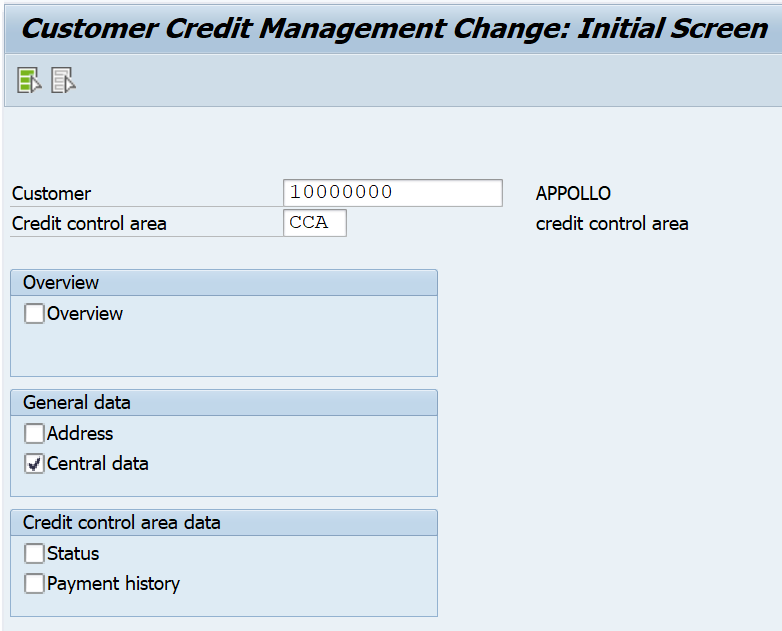
Give maximum credit limits in Total, individual amount fields and Currency

Configuration has been done, now go for transaction posting (end user will post).
Similar content you may like:
- How to Create Customer Master data in SAP: Click here
- How to Create Customer Business Partner in S4 Hana: Click here
- How to Post Customer Invoice (FB70) in SAP: Click here
- How to Display a FI Transaction (FB03) in SAP: Click here
- How to check the Customer open items in SAP: Click here
- How to check Customer account balance in SAP: Click here
- How to Post Manual Customer Payment in SAP: Click here
SAP FICO Configuration topics:
- SAP Finance Enterprise structure: Click here
- SAP Finance GL Accounting: Click here
- SAP Finance Accounts Payable: Click here
- SAP Finance Accounts Receivable: Click here
- SAP Finance Bank Accounting: Click here
- SAP Finance New Asset Accounting: Click here
- How to Create a Controlling area in SAP: Click here
- SAP Controlling – Cost Element Accounting: Click here
- SAP Controlling – Cost Center Accounting: Click here
Discover more from sap96.com
Subscribe to get the latest posts sent to your email.